Lighthouse Scores
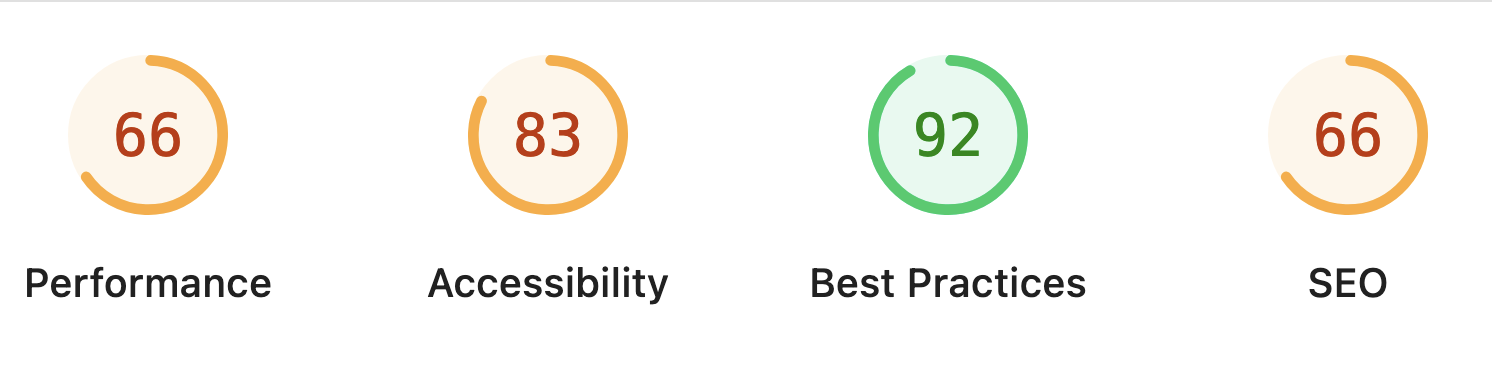
Using Lighthouse, it immediately becomes clear that this website has numerous issues across different areas.
Performance
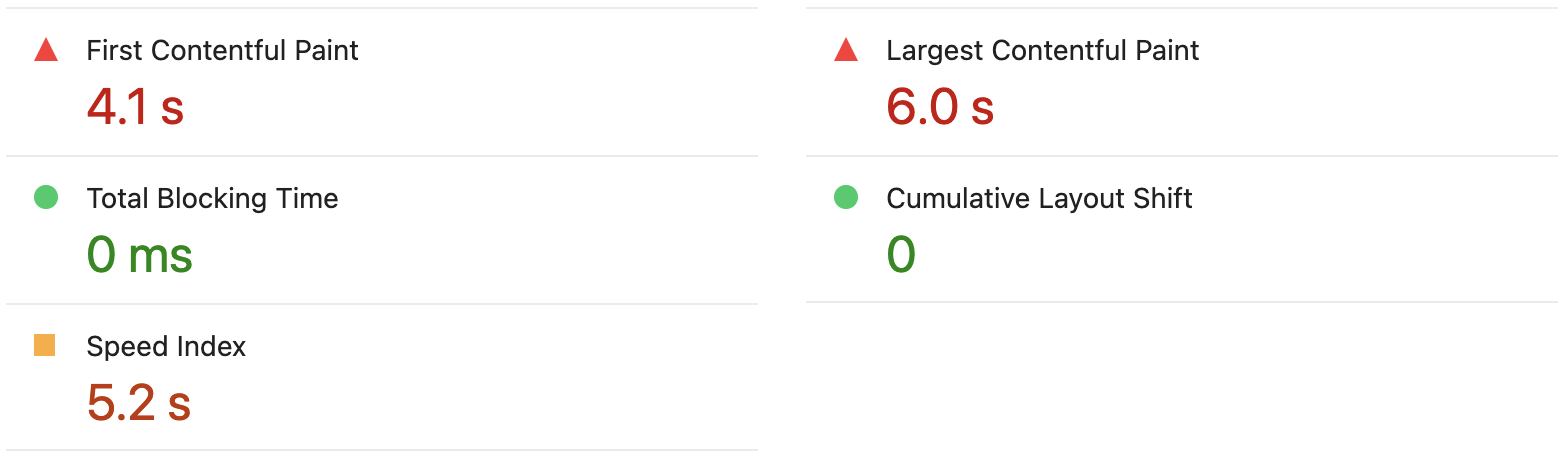 What can I say? The site is slow... I haven't ever optimized it for speed, and it shows.
The primary objective has always been to get it up and running.
What can I say? The site is slow... I haven't ever optimized it for speed, and it shows.
The primary objective has always been to get it up and running.
However, the Lighthouse report shows many 1st party files which are taking a long time to load from "tugraz.at". So perhaps my network connection/the server infrastructure isn't optimal either.
Something I can definitely improve is specifying alternative default fonts while the primary one is still being loaded. Furthermore, I should probably optimize the maximum critical path latency of the network dependency tree, as that seems like a simple/quick fix. Also, I will specify the desired width and height of images using the respective HTML attributes.
Some of the issues highlighted by the report are concerned with Bootstrap's jQuery, which I most likely won't be changing anytime soon.
Accessibility
In this section, I will only talk about those points on accessibility which are listed in the Lighthouse report. Any additional considerations will be listed under More on Accessibility.
-
Links do not have a discernible name:
Ah, yes... the links in the navigation on the top of the page do not have any text/name (at least when viewed on devices with a small screen). You got me there. Might as well check some other icon-based links too. -
Touch targets do not have sufficient size or spacing:
I was a little surprised to learn about this one, but upon further inspection, it does make sense in some places. There are a few links within small text, those are problematic. On the other hand, there are also a few false positives in here, like one of two buttons which are exactly the same – I'm not sure yet what went wrong here. -
Document does not have a main landmark:
This is a hard pill to swallow, I'm sorry! Yes, there is indeed no<main>tag to be found anywhere on the site. My bad. Hint: There's also no<header>or<section>! -
Heading elements are not in a sequentially-descending order:
The last one that was detected automatically. In the cookie banner, I'm incorrectly using an<h4>. I did try to get the order of headings right – nice catch.
Finally, Lighthouse also reports some "Additional items to manually check", which it doesn't classify. Noteworthy mentions include "The page has a logical tab order", "Visual order on the page follows DOM order" and "User focus is not accidentally trapped in a region".
Best Practices
First off, browser errors are still being logged to the console. The issue here lies with some tracking script-tag/pixel from Meta (Facebook). On first glance, it appears to be a CSP configuration error, which I will look into.
Other than that though, there don't seem to be any serious issues here.
SEO
The main problem with SEO for the STUDY EXPLORER is the fact that any pages under "tc.tugraz.at" are being blocked from indexing by the robots.txt file. Apparently, this is not open to discussion (according to higher-ups, after my team and I have raised awareness for this issue before). Therefore, a different kind of solution will need to be implemented, e.g. a landing page which itself may be indexed, used to promote and link to the STUDY EXPLORER. Once this situation is resolved, it should be much easier for prospective users to actually find the tool online.
More on Accessibility
In this section, I'll note a few more things on accessibility that weren't mentioned before. This is however still not an exhaustive list of possible shortcomings.
- For starters, I know that I'm not using any aria-attributes.
- Moreover, some "Jump to content" type of shortcuts would be nice.
- Concerning the many modal dialogs and popovers, I would assume those are difficult to understand when using a screen reader.
-
Lastly, my team and I have made the decision early on, that every sub-section of the page should be within a single HTML file.
Thus, all the navigation elements at the top of the page are links to
<div>s with a unique id. This makes the structure quite convoluted and unclear, but will probably not be changed in the future.
This was fun! I genuinely enjoyed compiling this report, and can't wait to implement these improvements, now that I actually know some of what needs to be done. Here's to hoping that my employer will agree that we must consider accessibility and work towards maintaining a higher standard in the future. Though I am certain we will finally make time for this – since the topic has come up multiple times in the past.